

Internal Bindings
The Internal Bindings dialog provides a consolidated view for managing all internal binding settings of a virtual IED’s inputs. It is accessible from the context menu of a virtual IED in the Function Specification Diagram.
Accessing the Dialog
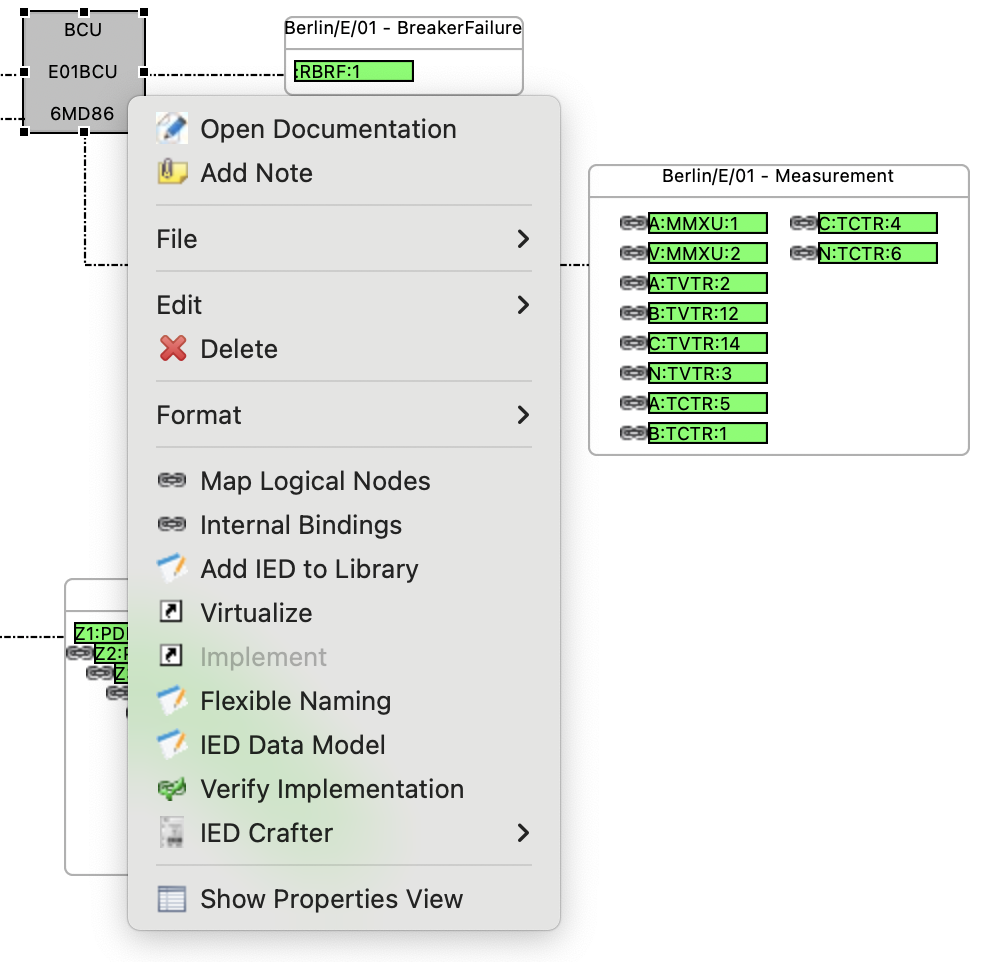
Right-click on a virtual IED in the Function Specification Diagram and select Internal Bindings from the context menu.
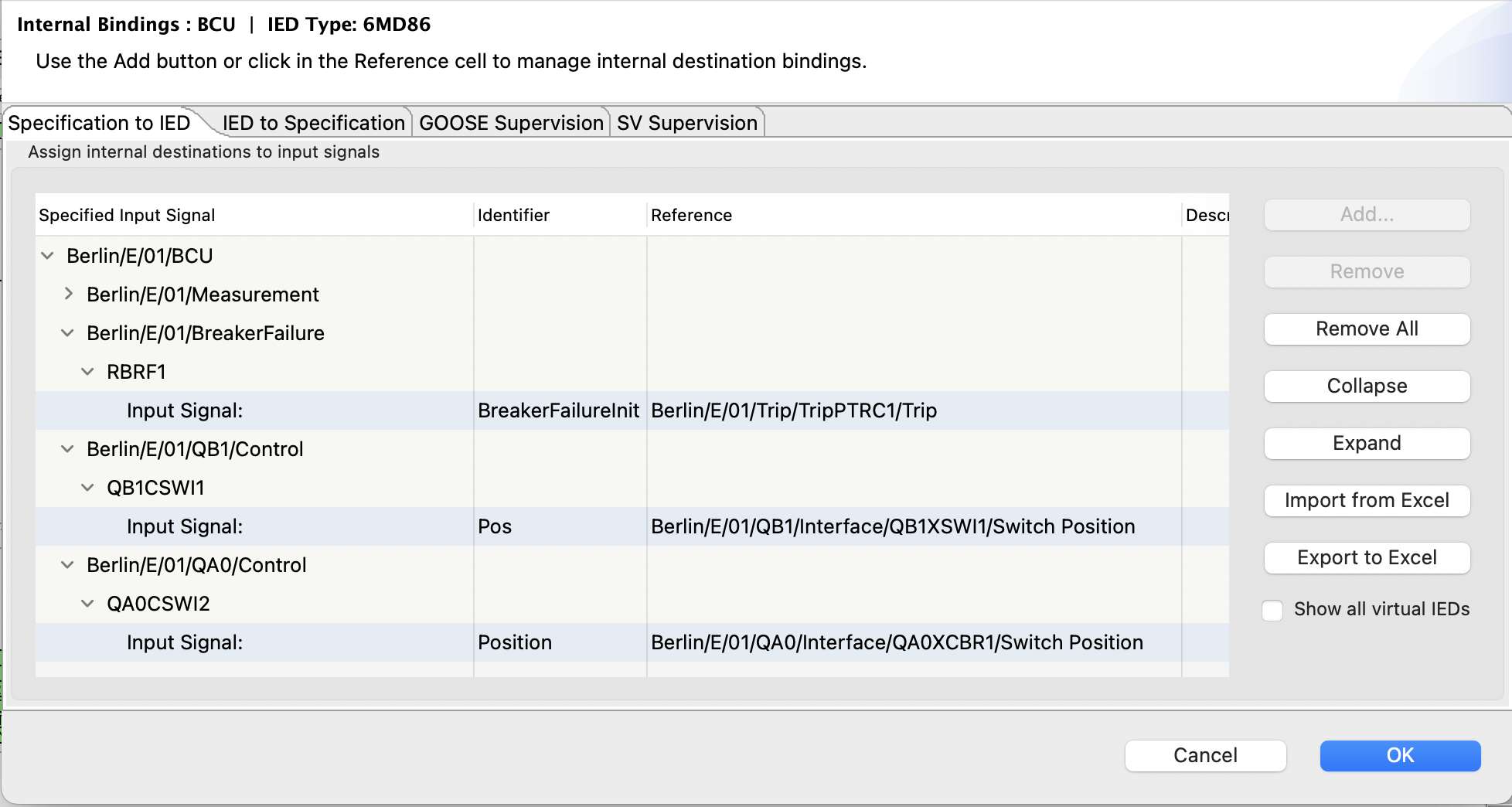
The dialog title shows the device role and IED type (e.g. “Internal Bindings : BCU | IED Type: 6MD86”). If the virtual IED has a variant, it is also shown.
Overview
The dialog is organized into four tabs:
|
Tab |
Purpose |
|---|---|
|
Specification to IED |
Assign internal destinations to specified input signals |
|
IED to Specification |
Map ExtRef and InRef objects from the IED data model back to specified input signals |
|
GOOSE Supervision |
Manage LGOS logical node assignments for GOOSE subscriptions |
|
SV Supervision |
Manage LSVS logical node assignments for Sampled Value subscriptions |
Specification to IED
The default tab shows a tree of all specified input signals grouped by virtual IED, function, and logical node. Each input signal can have one or more internal binding children that define where the input data is routed inside the IED.
The tree has the following columns:
|
Column |
Description |
|---|---|
|
Specified Input Signal |
The signal path in the specification hierarchy (Virtual IED / Function / LNode / Signal). For destination rows, shows the destination type prefix. |
|
Identifier |
The internal address or reference identifier within the IED. Editable — click to open the appropriate chooser dialog. |
|
Reference |
The source signal reference (e.g. “Berlin/E/01/Trip/TripPTRC1/Trip”) |
|
Description |
Purpose or description of the binding (from the InRef or ExtRef description) |
|
Formula |
Optional formula for dynamic reference resolution using STS variables. Editable. |
FinalDestination Types
When adding a new destination with the Add… button, you can choose from three types:
|
Type |
Description |
|---|---|
|
ExtRef |
External Reference — an IEC 61850 subscription (GOOSE or Sampled Values). Links the input signal to a specific ExtRef element in the IED’s Inputs section. |
|
InRef |
Internal Reference — device-internal routing. Points to an InRef data object (DOI) within a logical node. The InRef carries a |
|
DA |
Data Attribute — direct binding to a data attribute in the IED model, typically for IED Proxies |
Formulas
The Formula column allows parameterized reference resolution. A formula can reference STS variables that are resolved in the context of the virtual IED. This is useful when the same binding pattern applies across multiple devices but with different concrete addresses.
IED to Specification
The second tab shows the reverse perspective: it lists all ExtRef and InRef objects defined in the actual IED data model, organized by Access Point, Logical Device, and Logical Node. For each ExtRef or InRef, you can assign it to a specified input signal.
This tab is useful when working from an existing IED configuration and wanting to connect its subscription entries to the specification.
GOOSE and SV Supervision
The GOOSE Supervision and SV Supervision tabs manage the assignment of supervision logical nodes (LGOS and LSVS) to subscriptions. Each row represents a subscription and shows:
|
Column |
Description |
|---|---|
|
Control Block Reference |
The GOOSE or SV control block being supervised |
|
Add Quality |
Whether to subscribe to quality information |
|
Add Time Stamp |
Whether to subscribe to timestamp information |
|
Supervision LN |
The assigned LGOS or LSVS logical node |
|
Description |
Description of the supervision entry |
When automatic supervision allocation is enabled during communication configuration, the assignments appear here and can be reviewed or corrected.
Toolbar Actions
The Specification to IED tab provides the following actions:
-
Add… — add a new internal destination to the selected input signal (opens a type chooser, then the appropriate selection dialog)
-
Remove — remove the selected FinalDestination
-
Remove All — remove all FinalDestinations from the selected input
-
Collapse / Expand — navigate the signal tree
-
Automatic mapping — attempt to automatically match input signals to available IED destinations
-
Import from Excel / Export to Excel — bulk editing of binding assignments via spreadsheet
-
Show all virtual IEDs — when enabled, the tree shows input signals from all virtual IEDs assigned to this IED, not just the current one
Changes made in the Internal Bindings dialog are preserved across subsequent runs of the SCL communication configuration — they are treated as manual overrides.