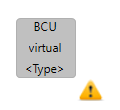
An existing, real IED can be assigned to one or more virtual IEDs by using the ‘Implement’ action of the right-click menu of the respective virtual IED. When assigned, the virtual IED will display the name of its associated IED in the center text, and the type ( according to the IEDs iedType attribute) in the bottom text.
The ‘Virtualize’ action removes the association to the real device, making it available to assign a different device. For convenience, the iedType retains the value of the most recently mapped device.
The decoration icon of the Virtual IED is changed when it is “implemented”