

Same concept described in Function Templates can be applied to Equipment Function Templates.
But equipment Function can also be intrinsic of the Equipment. This is the case is if the equipment function doesn't have the template properties defined. In this case the Equipment function is part of the unitary library element Equipment and isn’t represented on the library.
The intrinsic Equipment function cannot be shared across multiple Equipment.
Content
Same concept described in Function Templates can be applied to Equipment Function Templates.
Representation on library
Same concept described in Function Templates can be applied to Equipment Function Templates.
The link with an equipment is shown on the library manager.
Add to library
Same concept described in Function Templates can be applied to Equipment Function Templates.
Update from library
Same concept described in Function Templates can be applied to Equipment Function Templates.
Usage
After an equipment function has been added to the library, its ‘Template’ property will show the library key, and the function becomes available in the area of the editing palette in the drop down of the related Equipment:
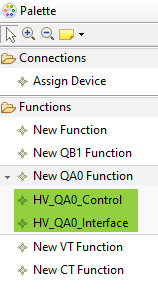
These tool entries will then produce a duplicate of the original equipment function at the time when it was added to the library.