

Experimental feature — The Implementation editor is an opt-in feature. It will be enabled by default in future releases. To access it, add --features ComConfEditor either as a command-line parameter to your shortcut, or to the STS_SI.ini file in your installation directory.
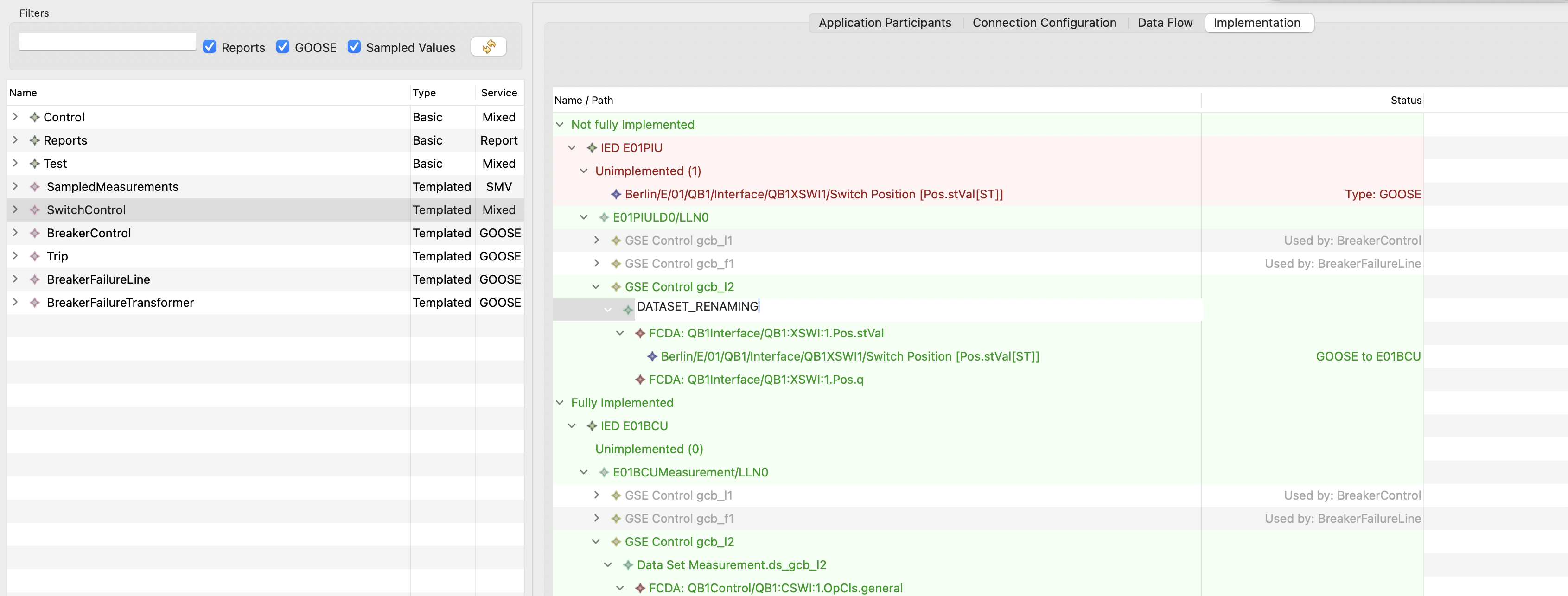
The Implementation editor is an additional tab available in the Application detail panel. It provides a tree view of all IEDs that publish data via the currently selected application, showing only communication artifacts such as control blocks, datasets, and FCDAs.
Overview
The Implementation editor allows you to tailor the details of how an application is implemented at the SCL level. It supplements the automatic SCL communication configuration with manual changes that are preserved across future configuration runs.
What is Shown
The tree is organized into two groups:
-
Not fully Implemented — IEDs where some specified signals do not yet have a corresponding control block, dataset, or FCDA. The count of unimplemented signals is shown (e.g., “Unimplemented (1)”).
-
Fully Implemented — IEDs where all specified signals are fully covered.
For each IED, the tree displays:
-
Logical Devices and Logical Nodes (e.g., E01PIULD0/LLN0)
-
Control Blocks — GSE Control blocks with their names (e.g., gcb_l1, gcb_l2). The Status column shows which application uses each control block (e.g., “Used by: BreakerControl”).
-
Datasets associated with those control blocks
-
FCDAs (data references) within each dataset, with the full path and signal reference shown
-
Unimplemented Signals that are currently not implemented. Signals can also be dropped on this node to clear all current implementation
Data that is specified by the current application is highlighted in green, making it easy to distinguish application-owned artifacts from other communication elements on the same IED.
Use Cases
Assign a preconfigured control block
If an IED comes with preconfigured control blocks in its ICD file, you can assign which specific control block a given client should subscribe to, rather than relying on automatic assignment.
Move control blocks and datasets
Control blocks and datasets can be moved to a different logical device or logical node. This is useful when the vendor's ICD structure requires specific placement of communication artifacts.
Unify datasets and control blocks
Data from multiple applications can be combined into a single dataset and control block. This requires editing each involved application's implementation to point to the shared artifacts.
Split data across multiple control blocks
Conversely, data specified in a single application can be distributed across multiple control blocks and datasets, for example to separate time-critical signals from less critical ones.
Scope of Changes
-
Changes made in the Implementation editor apply to individual IEDs in regular, non-templated applications
-
For application templates, the scope can be changed by toggling the mode button in the toolbar. By default, changes apply to all current and future IEDs of the same type (and variant, if applicable).
-
Manual changes are preserved across future runs of the SCL communication configuration