

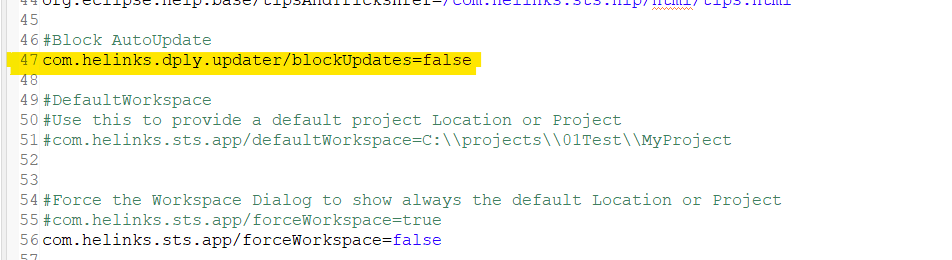
If the installation is centrally managed, it may be necessary to prevent individual updates. By setting the “blockUpdate” parameter in the plugin-customization.ini file, updates are blocked, and all menu items providing update options are suppressed from the Help menu.
📘 Instructions
Proceed as follows:
-
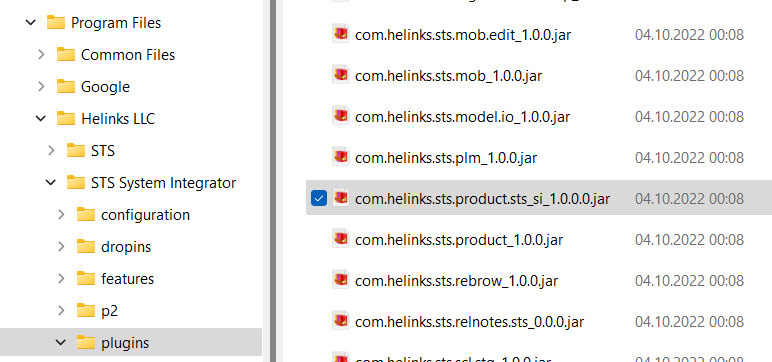
Locate the plugin com.helinks.sts.products_sts_si_1.0.0.0.jar in your installation directory.
-
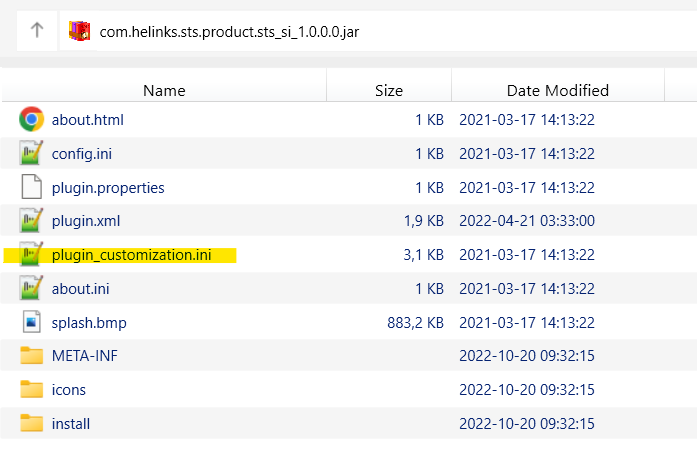
Extract the file plugin_customization.ini
-
Set the “blockUpdates” parameter in the file to “true” and replace the file in the plugin jar with the changed one. See here how to extract and update a file from a jar container: How to update a file from a jar container
-
Restart Helinks STS.
You need Administrator Rights to perform this operation
Unappropriate changes of the jar file may prevent Helinks STS from starting