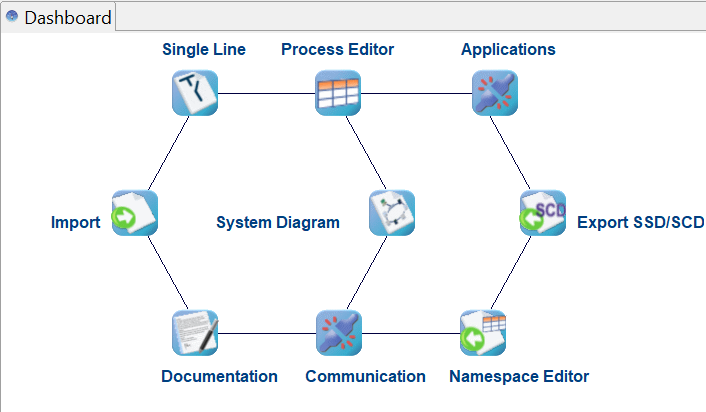
This page describes each functionality of the tool which is found on the dashboard.
|
Name |
Icon |
Description |
|---|---|---|
|
Single Line |

|
It is used to do the System Specification for one or more Substations. Thus, it shows the single line diagram and function specification and virtual IEDs assigned to functions, and communication specification. |
|
Process Editor |

|
The Process Editor is used to do the System Specification for any electrical System that can be modelled with IEC 61850. It features the Process element and allows to build a hierarchical Process Structure with Process Elements, Power Lines and Substations. |
|
Applications |

|
The Applications editor is used to specify horizontal and vertical communication. |
|
Import |

|
HELINKS STS can import any SCL file to the system. It recognizes if the file contains a template IED (ICD) or if it contains more than one IED (SCD). |
|
System Diagram |

|
The IEDs from SCL files which are imported are shown in this section and users can create instances of template IEDs. IEDs can be connected to subnets by assigning IP addresses. |
|
Communication |
|
IED data models and their data sets, communication control blocks of the system are found in this section |
|
Documentation |

|
Can generate a PDF report of the SAS design. |
|
SSD/SCD Export |

|
Exports the SCD or SSD file of the SAS design. |
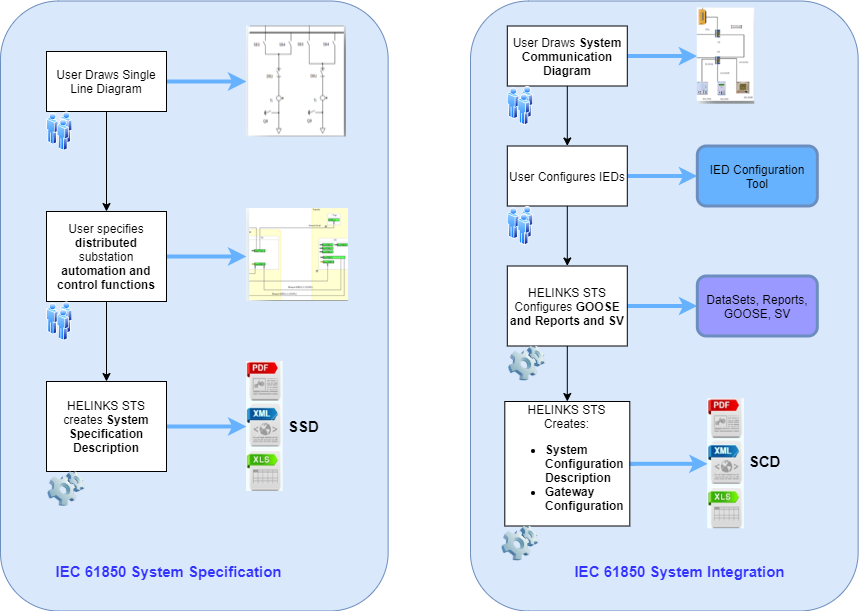
Engineering Workflow With Helinks STS